
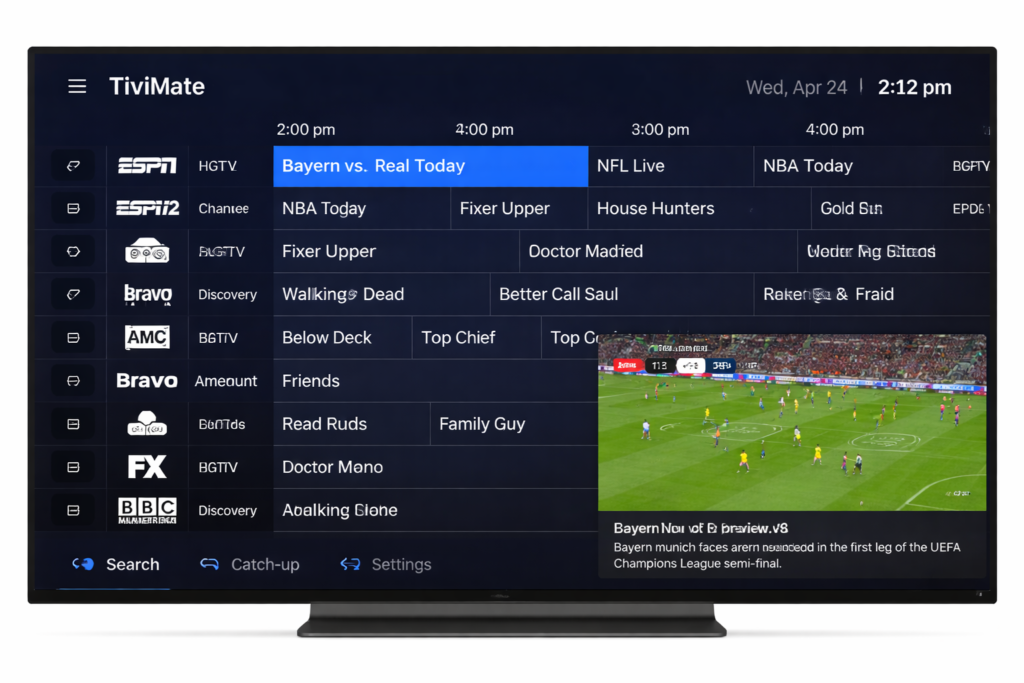
For many people, the first confusing thing about IPTV is understanding what the player actually does. A lot of beginners assume the app itself provides the channels, but that’s usually not how it works. In most cases, the player is simply the app you install on your device to load a playlist, organize channels, and make everything easier to watch.
That difference matters.
Two users can have the same playlist but completely different experiences depending on the player they use. One app might feel smooth, organized, and easy to browse, while another may feel slow or cluttered. The content might be similar, but the viewing experience can be very different.
Most modern IPTV players support one of two common setup methods:
- M3U playlist URL
- Xtream-style login
An M3U playlist is usually a direct link or file containing channel streams. Xtream login is more structured and normally includes a server URL, username, and password. Many users prefer Xtream because it often loads categories, movies, series, and guide data in a cleaner way.
For beginners, one of the most important parts of the setup is not just choosing a player, but knowing where to get a working playlist that is easy to load and compatible with the app they want to use. Many users start by comparing PREMIUM IPTV PLAYLIST OPTIONS before deciding which player fits their setup best.
TiviMate
TiviMate is one of the most talked-about IPTV players, especially among people using Android TV devices. A big reason is the layout. It feels more like a proper television guide than a basic media app, which makes it easier to use on a daily basis.
It’s popular because the interface feels polished, categories are easier to browse, and channel navigation is usually smoother than in simpler apps. For users who mainly watch live TV, TiviMate often feels more comfortable and organized.
It also tends to work well for people who care about guide data, favorites, and a cleaner overall layout.
IPTV Smarters
IPTV Smarters is another common choice because it is simple, familiar, and works on many devices. A lot of users start with it because it supports the main login types and doesn’t feel difficult to understand.
It combines live TV, movies, and series into one interface, which makes it practical for people who want an all-in-one setup. It may not always feel as polished as some TV-first apps, but it is straightforward and widely used.
For beginners, that simplicity is often exactly what makes it useful.
XCIPTV
XCIPTV is also widely used, especially on Android-based systems. It usually feels like a middle ground between a basic player and a more modern one. The design is cleaner than some older apps, and it tends to appeal to users who want something simple without feeling outdated.
It supports the usual playlist formats and gives users a structure that feels manageable. For people who don’t want too many settings or extra complexity, XCIPTV is often a comfortable choice.
8K VIP Player
8K VIP Player is another player that some users prefer on devices such as Firestick, Android boxes, and similar systems. It tends to appeal to people who want something straightforward once the app is installed and activated.
In real use, players like this are often chosen because they match how many viewers actually watch content. Most people do not want to spend a long time adjusting settings. They want to install the app, add their details, and start watching.
That is where simpler players often stand out. They are built around ease of access, which makes them attractive for users who mainly care about loading their content quickly and using a remote without hassle.
VLC
VLC is a bit different from the others. Most people do not use it as their main IPTV player long term, but it is still very useful. If someone wants to quickly test an M3U link, VLC is one of the fastest ways to do it.
It is lightweight, familiar, and available on many systems. While it does not provide the same organized IPTV interface as dedicated streaming apps, it is still helpful for checking whether a playlist works.
How Users Usually Add Playlists
Once a player is installed, setup is usually simple.
If someone is using an M3U playlist, they open the app, choose the option to add a playlist, paste the link, and save it. The app then loads the channels and often organizes them into categories.
If they are using Xtream login, the setup is usually even more structured. They enter the server URL, username, and password, and the player pulls in the content automatically.
This is one reason many users prefer Xtream-style setup. It often feels cleaner and easier from the beginning.
Where the Playlist Comes From
This is the part many beginners focus on most. After installing the player, they still need a source for the playlist itself. That usually means getting one of the following:
- an M3U playlist URL
- Xtream login details
- correctly organized categories
- content that works well with common players
The best experience usually comes from using a source that is easy to copy into the app and works well across popular players. If the playlist is messy or the setup details are unclear, even a good app can feel difficult to use.
That is why many users first focus on choosing the right playlist source, then choose the player that feels best on their device.
What Works Best on Firestick, Onn, and Shield
On Android-based systems like Firestick, Onn boxes, and NVIDIA Shield, stability and ease of navigation usually matter more than anything else. Most users are not looking for the app with the most features. They want one that opens quickly, handles playlists properly, and feels comfortable to control with a remote.
A player that works well on a phone may not feel as good on a TV. Likewise, an app that looks impressive at first may feel annoying after a few days of actual use.
That is why many users end up trying more than one player before they settle on the one that feels right for their setup.
Final Thoughts
The player is what turns a playlist into a usable entertainment experience. Without a good player, even a decent playlist can feel disorganized. With the right one, browsing channels, loading categories, and watching content becomes much easier.
That is why these apps matter so much.
They do not just open the channels. They shape the entire viewing experience.
For most people, the best approach is simple: choose a player that fits your device, supports the login format you have, and feels easy enough to use every day. And just as importantly, start with a playlist source that is clear, stable, and easy to load into the app you choose.